A visual editor for Next.js, on macOS
The mid between
code and no-code.
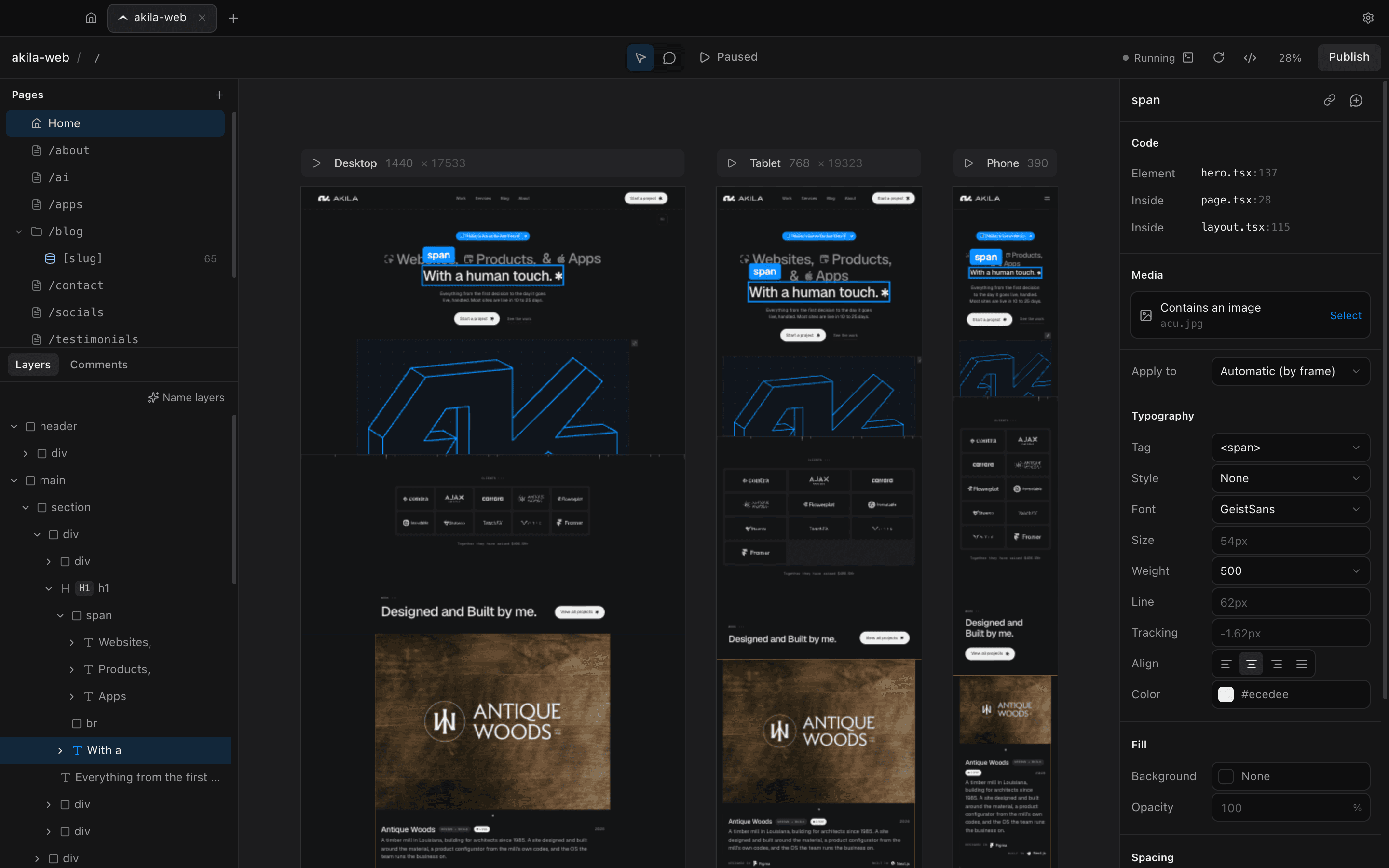
midcode opens your project on a live canvas. Click anything to see where it lives in the code, refine it by hand, and every change lands in your source files as a clean, minimal diff.
Next.js + Tailwind CSS · No account · Everything stays local
Features
Design on the real thing.
No mockups and no export step. midcode edits the site you already have, in the same files your agent works in.
Live breakpoints
Your real site runs live on an infinite canvas at Desktop 1440, Tablet 768 and Phone 390, each at full page height, side by side.
Click to code
Select any element and midcode shows exactly where it’s written, file and line, plus the component it sits inside.
Edit with your tokens
Typography, color, spacing, radius, text styles and tags, straight from your Tailwind @theme. Classes are swapped in place, never reprinted.
Comments for your agent
Pin comments to elements, attach files, then Copy for your agent: a brief with file:line that Claude Code or Cursor can act on.
Publish to Git & Vercel
Publish lists every change, then commits and pushes. On a Vercel-connected repo, that’s a deploy.
Apple Intelligence on-device
Let Apple Intelligence name your layers. It runs on your Mac: offline, free, and no tokens spent.
And the details that make it feel right
- Double-click any text to edit it
- Replace images, videos and backgrounds
- Edit alt text where the image lives
- Play runs the site. Pause inspects it
- Full-size preview with Hide UI
- Undo for every single edit
- Rename layers, or let them name themselves
- No account. Everything stays on your Mac
- Minimal diffs you can read in git
Why midcode
Born from building sites with Claude Code. Move fast in code with your agent, then refine the details visually, without spending a single token. When something needs more than a nudge, leave a comment and hand your agent the exact file and line.
How it works
Three steps. No new workflow.
Step 1: Open your project folder
Point midcode at a Next.js + Tailwind project. It starts the dev server and lays out every breakpoint. Nothing to configure, nothing uploaded.
Step 2: Edit on the canvas
Click, double-click, adjust. Each change is written straight into your source files, and every edit can be undone.
Step 3: Publish
Review what changed, then commit and push in one click. Your repo stays the single source of truth.
Install
Get midcode
Coming soonmidcode isn’t available yet. When it ships, you’ll be able to install it any of these ways. The commands below won’t work until then.
Download the app
Get the .dmg, drag midcode to Applications, and open your first project.
Homebrew
Install from your terminal and keep it updated with brew.
brew install --cask midcodeOne-line install
A single script that downloads and installs the latest release.
curl -fsSL https://midcode.app/install.sh | sh
Design in the code you already have.
Open a project, click anything, ship the change. Your agent handles the big moves. You handle the details.